Super Replace 2.2

Super Replace
Text Processing · v2.2 · info-mac
| Filename | super-replace-22.hqx |
|---|---|
| Size | 1,069.9 KB (1095583 bytes) |
| Downloads | 0 |
Download super-replace-22.hqx
Up to 5 concurrent downloads per IP. No speed limit.
About
Announcing the release of SuperReplace 2.2 ! SuperReplace is a powerful text conversion utility.
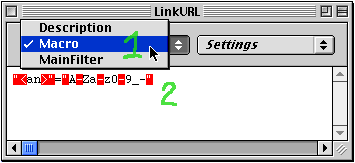
[What's it?] SuperReplace is a powerful application for creating text conversion utility, called "Filter". To use filter to do the conversion, just drag and drop input text files onto the filter icon under Finder.The syntax of filter is very easy to understand.
[Easy to use] Using a bi-style editor, it doesn't use any special character unlike classical system. You can write " \ CR and TAB directly in your filter. An assistant helps you to edit filter. Non programmers as well as programmers can use it very easily.
[Powerful] Very fast. Replace strings. Search regular expression(pattern). Insert variables in the output text files. Preferences for selecting input files.
[Examples] SuperReplace can be used for reformating HTML file. You have saved a web page from Netscape as TEXT or as HTML, but you don't like the file format: The accents are missing for french accent letters, the format isn't compatible with your database or your text editor, you need to extract only a few lines, or any PC/Mac/Unix file format problem, multi-columns problem, tabulation and space problems...
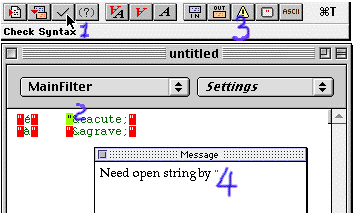
[What's New?] - Save font in global preference and filter preference. If you don't like SuperReplace font, this is for you! - Compatible with MacOS 8.6. Changed the 'FOND' resources in SuperReplace font and SuperReplace application. - Fixed a bug in input window. Needn't click on the textbox to edit input text. - Check syntax more fast. Remove Checking syntax dialog. - Drag text files onto Filter application: much more fast if no sub-filter. Like PowerReplace. - Added "Replace Report". After the conversion, a file named "Replace Report" will be created automatically in the SuperReplace application folder. You can check this file for more information about the conversion.
Screenshots
Notes
This file was archived from info-mac / funet and is provided for historical preservation. Most files are in BinHex (.hqx) or StuffIt (.sit/.sea/.cpt) format; you will need The Unarchiver or a classic Mac emulator to open them.